
MainFlow PRO: the new era of Refrigeration & HVAC maintenance
MainFlow becomes PRO: the new version of the software for refrigeration and HVAC maintenance
Anyone who provides maintenance and service for refrigeration systems knows that moment when a problem comes up that has nothing to do with any individual system. A technician’s certification expired the week before. A van inspection that nobody had marked down. A refrigerant cylinder that was missing from the warehouse, and a technician who came back empty-handed.
The actual work, breakdowns, temperature-controlled rooms running out of range, mandatory checks... is already enough. Everything else piles up around it: Excel spreadsheets, WhatsApp messages, folders in the office and a government portal that has to be filled in manually, one job at a time.
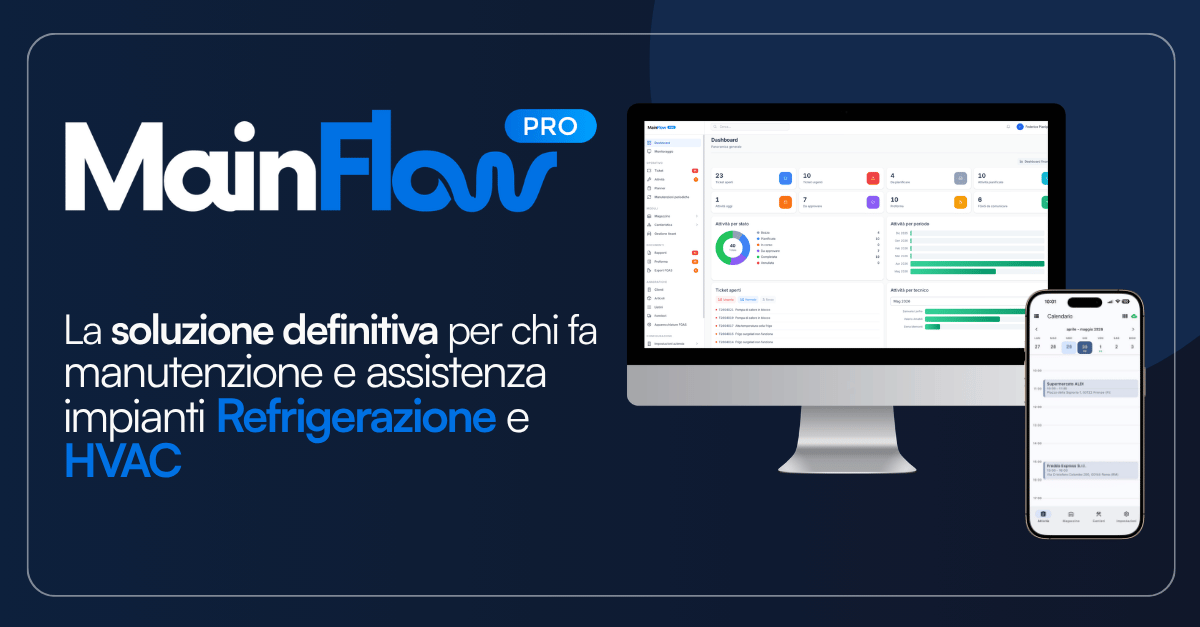
That is what we have been working on: MainFlow PRO is now available, Advinser’s software for Italian companies providing service and maintenance for refrigeration and HVAC systems. Service calls, F-GAS compliance, vehicles, certifications, inventory and installation projects in a single system, accessible from a browser in the office and through a mobile app in the field.
What’s new in this version
MainFlow PRO brings together the features companies using MainFlow every day have asked for most often over the past two years, collected one by one through site visits, support calls and onboarding sessions.
- Asset Register, the new module: company vehicles, equipment and staff qualifications, each with its own deadlines.
- Inventory extended to vans: not just warehouse stock, but also what every technician has on board.
- Project management: estimates and installation jobs managed from site survey through to completion.
- Redesigned interface, with one clear goal: reduce the learning curve.
- AiKITO, the AI assistant inside the management system: it answers technicians’ questions and prepares operations for them.
F-GAS data management, service scheduling and the technician app remain at the heart of the product and have all been reviewed alongside the new interface.
F-GAS management: enter the data once
EU Regulation 2024/573, which replaced Regulation 517/2014 on 11 March 2024, together with Presidential Decree 146/2018, requires every service intervention, refrigerant movement and leak check to be recorded in the national database. Leak-check intervals are no longer calculated simply by the amount of refrigerant charged, but by tonnes of CO₂ equivalent, and vary from system to system depending on the refrigerant.
In practice, almost every company records this information twice. The technician writes it down in the field, on paper or on their phone; the office then enters it again, one record at a time, into the portal days later, when the details of the job are already less fresh. That is where hours are lost, and where errors happen: not in the work carried out on the system.
With MainFlow PRO, the technician enters F-GAS data directly into the app at the end of the job, while still standing in front of the equipment. Once. Refrigerant, quantity charged and recovered, type of activity, company and certified technician: mandatory fields are checked on site, while the equipment is still right in front of them for verification.
From that point on, the software takes over. MainFlow PRO collects all refrigerant movements for the period, across all technicians and systems, and prepares the file in the format required by the F-GAS Database. The company uploads it to the portal when convenient, using the bulk upload function. From that moment, the activities are officially submitted. Once confirmation arrives, MainFlow PRO recognises it, moves the activity to certified status and stores the certificate on the system record, where it remains available for the next service visit or an inspection.
The practical result is that you can see the status of every submission at any time, system by system, without opening the portal: to be submitted, submitted, certified. The system also calculates leak-check deadlines and sends an alert before they expire, instead of leaving them to someone’s memory.
Service scheduling and planned maintenance: the whole day on one screen
Scheduling is a calendar view with direct drag-and-drop. Assign the job to a technician, set the priority, and a notification reaches their phone with the address and navigation ready to go. Scheduling conflicts are flagged before they turn into an apologetic phone call to the customer.
Planned maintenance automatically generates work orders according to the frequencies set for each system and customer, with customisable alerts. It is the part that keeps maintenance contracts running without anyone having to remember which visits are due that month.
Urgent requests come in as tickets with priorities and response times. The office assigns a technician and the notification reaches the app immediately. The system keeps track of response times, so contractual SLAs can be demonstrated with data, rather than simply promised during negotiations.
Mobile app for refrigeration technicians: digital service reports, signatures and F-GAS data from the field
In the field, the technician receives a notification for each job, checks the system history before working on it, completes the service report, attaches photos, collects the customer’s signature and deducts used spare parts from the van inventory.
F-GAS data is entered directly into the same service report. It is the only time the information needs to be entered, and from there it is already ready for submission to the database.
The app also works offline. In a cold room, in the basement of a supermarket or inside a shielded industrial building, the technician can continue working as normal. The data remains on the phone and is automatically synchronised as soon as the connection comes back. On paper, it may sound like a minor detail. In the field, it can make the difference between an app that gets used and one that gets abandoned after two weeks.
At the end of the job, the customer receives a PDF report with the company logo. No carbon copy left on the counter, no report to type up again in the office the following day.
Asset Register: vehicles, equipment and certifications with their deadlines
This is the most requested new feature in this version, covering everything that currently lives in an office folder or in the head of one person.
The Asset Register keeps track of three main categories:
- company vehicles, including inspections, insurance, road tax and servicing;
- specialised equipment, including periodic calibration of leak detectors, required by regulations and easily forgotten;
- staff qualifications, including F-GAS certifications, PES/PAV electrical qualifications and driving licences.
Each deadline triggers an advance alert instead of appearing on the day it becomes relevant. A technician arriving at a system with an expired certification is a problem that tends to be discovered at the worst possible moment: in front of the customer, or worse, during an inspection. This is the feature designed to make sure it does not happen anymore.
Spare parts inventory and project management: van stock and new installations
This version also includes inventory held on vehicles, with stock movements linked to service calls, batch and refrigerant expiry management, and automatic reorder alerts. You know what is available in every van before the technician sets off, rather than after they have had to turn around empty-handed.
Project management is the other major new feature and is designed for installation work, which for many service companies represents the second major source of revenue. Estimates can be created using your own price lists, converted into active projects with a single click, and tracked from site survey through to completion, with digital progress tracking. It is particularly useful for installations in large-scale retail, industrial refrigeration and temperature-controlled environments, where projects can last weeks and involve multiple people.
Invoicing integration: from service report to invoice draft
MainFlow PRO integrates natively with Fatture in Cloud, TeamSystem, Zucchetti, Mexal and Aruba. Materials, hours worked and contract fees move from the signed service report to the invoice draft without re-entering anything, with XML export for electronic invoicing. For companies using an existing ERP or a custom-built management system, REST APIs and webhooks are available as part of a dedicated project.
This is the part you notice at the end of the month, and it is the one business owners mention most often: the time previously spent reconstructing what was done, for whom and using which materials before it could be invoiced simply disappears. So do the jobs that nobody had recorded and nobody ever invoiced.
A redesigned interface for people who are not particularly comfortable with computers
The objection we hear most often is not about price or features. It sounds like this: “My technicians are not very comfortable with computers. I don’t have time to teach them everything again.”
It is a reasonable objection, and it is the one we have worked on more than anything else. A software product does not fail when the contract is signed. It fails on Tuesday morning when a technician cannot find a button, calls the office, and someone tells them to forget it and write everything down on paper like they used to.
The MainFlow PRO interface has been redesigned from the ground up with one specific goal: reduce what people have to learn. Fewer steps to close a service report, fields that only appear when they are needed, and the same terminology people already use in the company. The technician continues to do what they have always done, complete the service report at the end of the job, only now they do it on their phone, and nobody has to enter it a second time.
AiKITO inside MainFlow PRO: ask instead of search
MainFlow PRO also introduces AiKITO, the artificial intelligence assistant that lives inside the management system rather than alongside it.
It is the next step in the same work. With the new interface, we have made it easier to find things. Here, you no longer need to search for them. The technician simply writes what they need, using the words they would use with a colleague, and AiKITO answers.
It does two things, and the second is the one that changes the working day.
It answers questions about the management system. How do you record recovered refrigerant? Which fields are required to close a service report? How do you prepare an F-GAS submission? Where can you see the history of a system? The answers come from MainFlow documentation, not from the internet. And when the information is not available, AiKITO says so and passes the request to a person instead of making something up. That is the behaviour that determines whether an assistant can be trusted.
It prepares operations for you. Open a service call, fill in a record, update a field: AiKITO prepares the action, shows it and asks for confirmation. The person always makes the final save, while the company decides which operations are allowed and for whom, profile by profile. No irreversible operation is ever carried out autonomously.
It is the same principle behind the rest of this version: the time you save does not come from doing things faster. It comes from not having to do them twice.
If you want to understand how an assistant that does more than simply answer questions works, we have written about it here: AiKITO, the AI assistant inside your management system.
Who is MainFlow PRO designed for?
MainFlow PRO is designed for service and maintenance companies working in commercial and industrial refrigeration, large-scale retail and supermarkets, the food industry, pharmaceuticals and healthcare facilities, hospitality and catering, refrigerated transport, cold rooms, air conditioning and HVAC, and facility management.
The common denominator is not company size, but the nature of the work: systems distributed across different locations, technicians constantly on the move, regulatory obligations to comply with and documents to keep.
Frequently asked questions
Does MainFlow PRO connect directly to the F-GAS portal?
MainFlow PRO prepares the submission file in the format required by the F-GAS Database, collecting all refrigerant movements for the period in a single file. The company uploads it to the portal using the bulk upload function. This is the only step that remains manual. Once confirmation arrives, the software automatically updates the status and stores the certificate.
Who is responsible for F-GAS obligations?
The obligations remain with the system operator and the certified company, as required by the regulations. MainFlow PRO handles the practical side: it collects the required data, checks that it is complete, calculates leak-check deadlines, prepares the submission within the required timeframe and stores the certificates.
Does the app work without an internet connection?
Yes. Technicians can work normally offline, including inside cold rooms or underground areas, and the data is synchronised as soon as a connection becomes available.
How long does it take to get started?
The account can be activated immediately and technicians can receive their first jobs on the same day. Importing data from the existing management system, configuring report templates and training technicians generally takes a few days of work together with the Advinser team.
Which invoicing software does it integrate with?
Natively with Fatture in Cloud, TeamSystem, Zucchetti, Mexal and Aruba. REST APIs and webhooks are available for other ERP systems as part of a dedicated project.
Try MainFlow PRO free for 30 days
The quickest way to understand whether it is the right tool is to see it on a real service job, not in a presentation.
👉 Start your 30-day free trial: data migration and onboarding support are included.
Or book a demo: we will show you the complete journey of a service call, from the customer’s request to the F-GAS submission file ready to upload to the portal.